Model Context Protocol – Connecting AI to the World
Contents
- Introduction
- Section 1: What MCP Is and Why It Matters
- Section 2: The Two Deployment Patterns
- Section 3: Building an MCP Server in Claude Code
- Section 4: Embedding MCP Directly into the Application
- What Changes
- The Tool Class
- The Two Embedded-Only Tools
- Registering the Embedded Server
- Demonstrating the Difference
- Closing
IntroductionLink to this section
MCP had its breakout moment in late 2024 and dominated developer conversation through 2025. Anthropic open-sourced the protocol in November 2024, and within months OpenAI, Google DeepMind and Microsoft had all adopted it. The SDK reached tens of millions of monthly downloads and the number of available MCP servers grew from a handful to thousands. By any measure, the protocol had won.
What lagged behind the hype was clarity about how to actually implement it. The concept is straightforward; the patterns are not always. Developers who understood what MCP was still found themselves uncertain about when to build a standalone server versus embedding one directly into an application, what the transport choices mean in practice, and how the pieces fit together in real code. This article works through both deployment patterns against a single concrete application, so the distinction becomes something you can see rather than something you have to take on faith.
Section 1: What MCP Is and Why It MattersLink to this section
The Problem with One-Off IntegrationsLink to this section
Every useful AI model eventually runs into the same wall. The model is capable, but it is isolated. It knows what it was trained on and nothing else. If you want it to query a database, read a file, call an API or check the state of a running service, someone has to build that bridge. And historically every bridge was custom: a bespoke plugin for one tool, a hardcoded function call for another, a brittle wrapper that broke every time the underlying service changed its interface.
This worked, after a fashion, when integrations were few and tooling was simple. It stops working at scale. An AI assistant with access to dozens of systems needs dozens of custom integrations, each with its own authentication model, error handling and maintenance burden. The result is either a narrow tool that does one thing well or a sprawling mess of glue code nobody wants to maintain.
MCP, the Model Context Protocol, is the answer to that problem. It defines a standard way for AI models to communicate with external tools and services, regardless of what those services do or how they are built. Instead of every integration being custom, every integration speaks the same language.
The Architecture in Plain TermsLink to this section
MCP separates the AI model from the tools it uses through three distinct roles.
The host is the application running the AI model. In most cases this is Claude Code, Claude.ai, or any other MCP-capable client. The host initiates connections to MCP servers and decides which tools are exposed to the model.
The client is the component inside the host that manages the MCP connection. It handles the protocol mechanics: discovering what tools are available, sending requests and receiving results. You generally do not interact with this layer directly.
The server is what you build. An MCP server exposes one or more tools, each with a name, a description and a defined input schema. When the model decides to use a tool, the host calls the server, the server executes the action and returns the result, and the model continues with that result in context.
Protocol note: MCP uses JSON-RPC 2.0 as its wire format. Servers launched as subprocesses communicate over stdio; servers hosted within a web application use HTTP with Server-Sent Events. The protocol is transport-agnostic by design, which is why the same MCP server logic can run as a subprocess or as a hosted service without changing what the tools actually do.
The key insight is that the model never calls your code directly. It describes what it wants to do, the host resolves that to a tool call, and the server handles execution. The model sees only the result. This means your MCP server can be written in any language, run anywhere and be replaced or updated without touching the model or the host application.
Why This Matters More Than It First AppearsLink to this section
The obvious value is that MCP makes it easier to connect AI to external systems. That is useful but not transformative on its own. The deeper value is standardisation.
When every integration speaks MCP, a tool built for one host works in any host. An MCP server you build for Claude Code today can be connected to any other MCP-compatible client tomorrow without modification. The ecosystem grows because the protocol is shared.
For practitioners this changes the calculus on what is worth building. A custom integration built for a single tool has limited return. An MCP server has unbounded reuse potential. Build it once, connect it anywhere.
There is also a maintenance argument. MCP servers are self-describing: every server exposes its tools with names, descriptions and schemas. A host can discover what a server can do without any prior knowledge. Update a server, add tools or change behaviour, and connected clients pick up the changes automatically.
Section 2: The Two Deployment PatternsLink to this section
MCP servers come in two fundamentally different shapes, and understanding the distinction is what makes the rest of this article useful. The protocol is identical in both cases. What differs is where the server lives relative to the application it controls.
Remote MCP: The Server Lives OutsideLink to this section
A remote MCP server is a standalone process or hosted service. It runs independently of both the host application and the AI client. The host connects to it over HTTP, typically via a URL registered in the Claude Code settings file or in a project-level configuration.
This is the right pattern when the capability you want to expose already exists as a service, or when you want the MCP layer to be reusable across multiple clients without touching the underlying application. You are building a bridge, not modifying what is on the other side.
The practical shape of a remote MCP server is a lightweight process that accepts MCP requests, translates them into calls against some downstream target (a REST API, a CLI tool, a database), and returns results. The downstream target does not know MCP exists. Nothing about it changes.
Example: The standalone MCP server built in Section 3 wraps the InventoryApp REST API. InventoryApp has no knowledge of MCP. The server sits in front of it, speaks MCP to Claude Code and speaks HTTP to the app. Adding or removing the MCP layer requires zero changes to InventoryApp.
Embedded MCP: The Server Lives InsideLink to this section
An embedded MCP server is compiled into the application it controls. It runs in the same process, shares the same memory space and has direct access to internal state that would never be visible through an external API.
This is the right pattern when the capability you want to expose is tightly coupled to internal application state. If the data you need lives in an in-memory structure that is never serialised to a REST endpoint, a remote MCP server cannot reach it. An embedded one can.
The embedded pattern is also the architecture behind any application that ships its own MCP surface as a first-class feature. The MCP server is not bolted on after the fact: it is part of the application's design, with the same access to internals as any other component.
Example: When MCP is embedded into InventoryApp in Section 4, the server gains access to the live internal event channel. Low-stock alerts fire the moment they are raised inside the service, without polling. That capability simply cannot exist in the remote pattern because the event channel is never exposed through the REST API.
Choosing Between ThemLink to this section
The deciding factor is access, not convenience. If everything you need is reachable via an existing API or interface, build remote. The separation keeps things clean and the MCP layer stays replaceable without touching application code.
If you need access to internal state, live event streams or in-process data that no external interface exposes, embed. The tighter coupling is the point. You are not wrapping the application: you are extending it.
The article that follows demonstrates both patterns against the same application, the same data model and the same tool names. The difference in what each pattern can and cannot do becomes concrete.
Section 3: Building an MCP Server in Claude CodeLink to this section
This section covers the complete build of InventoryApp and its remote MCP server. The goal is to show the full loop from a working C# application with a REST API, through to a separate MCP server that Claude Code can call, without modifying a line of the original application.
The Application: InventoryAppLink to this section
InventoryApp is a minimal ASP.NET Core Minimal API application that tracks an in-memory inventory of items. Each item has an ID, a name, a quantity, a storage location and a status that is recalculated automatically when quantity changes.
The Data ModelLink to this section
Three types form the core of the application. StockStatus is a simple enum:
public enum StockStatus { Active, LowStock, Discontinued }Item is a record with a single derived method that handles status transitions:
public record Item(
    string Id,
    string Name,
    int Quantity,
    string Location,
    StockStatus Status
)
{
    public Item WithQuantity(int qty) =>
        this with
        {
            Quantity = qty,
            Status = Status == StockStatus.Discontinued
                ? StockStatus.Discontinued
                : qty <= 5 ? StockStatus.LowStock : StockStatus.Active
        };
}
The WithQuantity method is the only place status logic lives. Discontinued items are never promoted back to Active regardless of quantity. Everything else transitions automatically at or below five units.
InventoryEvent captures everything that happens inside the service:
public record InventoryEvent(
    string EventId,
    DateTime OccurredAt,
    string EventType,
    string ItemId,
    string Detail
);
The ServiceLink to this section
InventoryService is a singleton that holds all state. It uses a ConcurrentDictionary<string, Item> for the item store and a capped List<InventoryEvent> for history. The detail worth noting is this:
public Channel<InventoryEvent> EventStream { get; } =
        Channel.CreateUnbounded<InventoryEvent>(
        new UnboundedChannelOptions { SingleReader = false }
    );
The EventStream channel is declared here, in Act 1, even though nothing reads from it yet. It exists because the service fires every event to both the history list and this channel. In Act 1 and Act 2, that channel goes unread. In Act 3, the embedded MCP server consumes it directly. The application did not need to change to support that.
Every mutation fires at least one event. A quantity update that crosses the low-stock threshold fires two:
var updated = existing.WithQuantity(qty);
_items[id] = updated;

Fire(new InventoryEvent(..., "QuantityUpdated", ...));

if (!wasLowStock && updated.Status == StockStatus.LowStock)
    FireLowStock(updated);
The REST APILink to this section
Six endpoints are registered via a static extension method on WebApplication:
GET    /items                   list all items
GET    /items/{id}              get a single item
POST   /items                   add an item
PATCH  /items/{id}/quantity     update quantity
DELETE /items/{id}              remove an item
GET    /events                  recent event history (last 50)
Each handler calls ConsoleRenderer before returning, so every request is logged to the terminal with method colour, route and status code. The app runs on port 5100.
Startup and the Console DisplayLink to this section
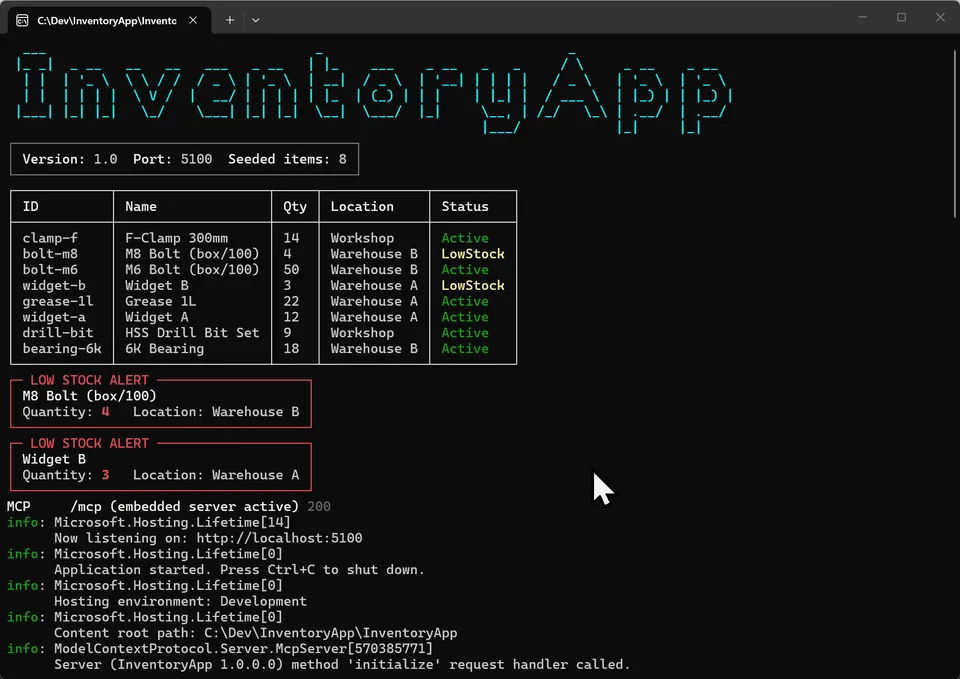
Spectre.Console drives all terminal output. On startup the application renders a figlet banner, an item table and immediate low-stock alerts for any seeded items already below the threshold:

The item table uses colour throughout: Active in green, LowStock in yellow, Discontinued in grey. Every API call that arrives logs a single styled line. The terminal becomes a live view of what the application is doing.
Building the Remote MCP ServerLink to this section
With InventoryApp running on port 5100, the remote MCP server is built as a completely separate Node.js project in TypeScript. It lives at C:\Dev\InventoryApp\InventoryApp.Mcp and has no reference to the C# solution.
The HTTP ClientLink to this section
The client layer is a thin wrapper over fetch. The base URL is configurable via the INVENTORY_API_URL environment variable, defaulting to http://localhost:5100. Five functions mirror the REST surface exactly:
const BASE_URL = process.env["INVENTORY_API_URL"] ?? "http://localhost:5100";

export async function listItems(): Promise<Item[]>
export async function getItem(id: string): Promise<Item>
export async function addItem(item: {...}): Promise<Item>
export async function updateQuantity(id: string, quantity: number): Promise<Item>
export async function removeItem(id: string): Promise<void>
The client handles 204 No Content responses (from DELETE) correctly by skipping JSON parsing when the status is 204. Error responses throw with the status code and body included in the message.
The Tool DefinitionsLink to this section
Tools are registered against an McpServer instance from the @modelcontextprotocol/sdk package. Zod schemas define the input for each parameterised tool:
server.tool("list_items", "List all inventory items",
    async () => ({
        content: [{ type: "text",
            text: JSON.stringify(await client.listItems(), null, 2) }]
    })
);

server.tool(
    "update_quantity",
    "Update an item's quantity",
    {
        id: z.string().describe("Item ID"),
        quantity: z.number().int().min(0).describe("New quantity"),
    },
    async ({ id, quantity }) => ({
        content: [{
            type: "text",
            text: JSON.stringify(
                await client.updateQuantity(id, quantity), null, 2)
        }]
    })
);
All five tools follow this pattern. The tool name, description and schema are the contract Claude Code uses to decide when and how to call each tool. The implementation is just the client function.
The Server Entry PointLink to this section
The entry point creates the server, registers tools and connects via StdioServerTransport. Logging goes to stderr because stdout is reserved for the MCP protocol:
const server = new McpServer({
    name: "inventory-remote",
    version: "1.0.0",
});

registerTools(server);

console.error("inventory-remote MCP server starting...");

const transport = new StdioServerTransport();
await server.connect(transport);
Registering with Claude CodeLink to this section
The server is registered in C:\Users\sverm\.claude\settings.json under mcpServers. Claude Code launches it as a subprocess and communicates over stdio:
"inventory-remote": {
    "command": "node",
    "args": ["C:\\Dev\\InventoryApp\\InventoryApp.Mcp\\dist\\index.js"],
    "env": {
        "INVENTORY_API_URL": "http://localhost:5100"
    }
}
or via command line
claude mcp add inventory-remote -- node C:\Dev\InventoryApp\InventoryApp.Mcp\dist\index.js
Using the Remote MCPLink to this section
With InventoryApp running and the server registered, Claude Code can query and modify the inventory through natural language. Ask for a list of items, update a quantity or add a new item and Claude calls the appropriate tool, the tool calls the REST API and the result comes back through the chain.

Simultaneously, the InventoryApp terminal shows the API calls arriving: GET /items in blue, PATCH /items/widget-b/quantity in yellow. The two processes are connected, and neither needed to know anything about the other beyond the HTTP contract.

Key point: InventoryApp.csproj was not touched to add the remote MCP. No new dependencies, no code changes, no recompile. The MCP layer is entirely external. This is the defining characteristic of the remote pattern.
Section 4: Embedding MCP Directly into the ApplicationLink to this section
The remote MCP server works well for everything the REST API exposes. But there are two things it cannot do. It cannot receive events the moment they fire, because HTTP is request-response and polling introduces latency. And it cannot see internal state that is never serialised to an endpoint.
Both limitations have the same root cause: the remote server is outside the process. The embedded pattern removes that boundary.
What ChangesLink to this section
Embedding MCP into InventoryApp requires three things: a NuGet package, a tool class and two lines in Program.cs. The application logic, the data model, the REST API and the Spectre.Console display do not change at all.
The dependency is ModelContextProtocol.AspNetCore, which integrates the MCP server directly into the ASP.NET Core host (verify the current release version on NuGet before adding the reference, as the SDK is actively developed):
<PackageReference Include="ModelContextProtocol.AspNetCore" Version="1.2.0" />Program.cs gains two additions. The services registration:
builder.Services.AddMcpServer()
    .WithHttpTransport()
    .WithTools<InventoryMcpTools>();
And the endpoint mapping, alongside the existing REST endpoints:
app.MapItemEndpoints();
app.MapMcp("/mcp");
That is the entire change to Program.cs. The MCP server is now running at http://localhost:5100/mcp, served by the same Kestrel host as the REST API.
The Tool ClassLink to this section
The tools are defined in Mcp/InventoryMcpTools.cs. The class is decorated with [McpServerToolType] and receives InventoryService via constructor injection, the same way any other component in the application would:
[McpServerToolType]
public class InventoryMcpTools(InventoryService svc)
{
    [McpServerTool(Name = "list_items"),
     Description("List all inventory items")]
    public string ListItems()
    {
        var items = svc.GetAll();
        LogToolCall("list_items");
        return JsonSerializer.Serialize(items, JsonOpts);
    }

    [McpServerTool(Name = "update_quantity"),
     Description("Update an item's quantity")]
    public string UpdateQuantity(string id, int quantity)
    {
        var updated = svc.UpdateQuantity(id, quantity);
            LogToolCall($"update_quantity({id}, {quantity})");
        return updated is null
            ? $"Item \"{id}\" not found."
            : JsonSerializer.Serialize(updated, JsonOpts);
    }
}
The five tools from the remote server are reproduced here, but they call InventoryService directly rather than going through HTTP. The tool names are identical, so from Claude's perspective both servers offer the same surface.
The Two Embedded-Only ToolsLink to this section
The embedded pattern unlocks two tools that are impossible in the remote version.
watch_low_stockLink to this section
This tool reads directly from svc.EventStream.Reader, the Channel<InventoryEvent> that has been open since Act 1. It drains up to ten pending LowStockAlert events without blocking, and if none are pending it waits up to three seconds for one to arrive. Non-matching events encountered during the drain are written back to the channel so other consumers are not affected:
[McpServerTool(Name = "watch_low_stock"),
 Description("Get pending low-stock alerts from the live
             internal event stream (embedded only)")]
public async Task<string> WatchLowStock(CancellationToken ct)
{
    var alerts = new List<InventoryEvent>();
    var reader = svc.EventStream.Reader;
    var writer = svc.EventStream.Writer;
    var nonMatching = new List<InventoryEvent>();

    while (alerts.Count < 10 && reader.TryRead(out var evt))
        if (evt.EventType == "LowStockAlert")
            alerts.Add(evt);
        else
            nonMatching.Add(evt);

    if (alerts.Count == 0)
    {
        using var cts =
                CancellationTokenSource.CreateLinkedTokenSource(ct);
            cts.CancelAfter(TimeSpan.FromSeconds(3));
        try {
            while (await reader.WaitToReadAsync(cts.Token))
            {
                while (reader.TryRead(out var evt))
                    if (evt.EventType == "LowStockAlert")
                    {
                        alerts.Add(evt);
                        if (alerts.Count >= 10) break;
                    }
                    else
                        nonMatching.Add(evt);
                    }
                    }
                if (alerts.Count > 0) break;
            }
        }
        catch (OperationCanceledException) { }
    }

    // Write non-matching events back so other consumers can still read them
    foreach (var e in nonMatching)
        writer.TryWrite(e);

    return alerts.Count == 0
        ? "No low-stock alerts pending."
        : JsonSerializer.Serialize(alerts, JsonOpts);
}
The remote MCP server has no path to this data. The event channel is an in-process construct. A quantity update that crosses the low-stock threshold fires a LowStockAlert event to the channel the instant it happens, and watch_low_stock can see it immediately. Because Channel<T> is a queue rather than a broadcast, each event can only be read once. The tool collects any non-matching events it encounters during the drain and writes them back so other consumers are not affected.
get_change_historyLink to this section
This tool calls svc.GetRecentEvents(200), returning up to 200 events from the in-memory history. The REST /events endpoint returns the last 50 and is the only external window into this data. The embedded tool sees the full history, including internal state transitions that the REST layer summarises or omits.
[McpServerTool(Name = "get_change_history"),
 Description("Get the full in-memory change history")]
public string GetChangeHistory()
{
    var events = svc.GetRecentEvents(200);
    LogToolCall($"get_change_history ({events.Count()} events)");
    return JsonSerializer.Serialize(events, JsonOpts);
}
Registering the Embedded ServerLink to this section
The embedded server uses HTTP transport rather than stdio, so it is registered in Claude Code differently from the remote server. In settings.json, both entries coexist:
"inventory-remote": {
    "command": "node",
    "args": ["C:\\Dev\\InventoryApp\\InventoryApp.Mcp\\dist\\index.js"],
    "env": { "INVENTORY_API_URL": "http://localhost:5100" }
},
"inventory-embedded": {
    "type": "sse",
    "url": "http://localhost:5100/mcp"
}
or via command line
claude mcp add --transport http inventory-embedded http://localhost:5100/mcp

Demonstrating the DifferenceLink to this section
With both servers registered and InventoryApp running, the practical difference becomes visible. Update widget-b's quantity to 2 using update_quantity through either server. The REST API receives the PATCH, the service fires a QuantityUpdated event followed by a LowStockAlert event, and the Spectre.Console terminal shows both.


Now call watch_low_stock through the embedded server. It reads the LowStockAlert event from the channel and returns it immediately. The same call through the remote server is not possible: there is no equivalent tool because there is no path to the channel from outside the process.


The takeaway: Both servers expose the same five core tools and either can be used for routine inventory queries and updates. The embedded server goes further because it runs inside the process. That access is not a convenience: for real-time event consumption it is the only option.
ClosingLink to this section
MCP is not a new abstraction layer for its own sake. It is a shared language that lets AI models talk to external systems without every integration being a one-off. The host, client and server separation keeps each concern in its place, and the transport-agnostic design means a server built today works with clients that do not exist yet.
The two deployment patterns serve different needs. Remote MCP is the right default when you are wrapping something that already has an external interface. Embedded MCP is the right choice when the application has internal state or events that no external interface can reach.
The InventoryApp example makes that distinction concrete: five tools are identical between the two patterns, and two tools exist only because the embedded server runs inside the process.
The full source code for InventoryApp including all three branches is available on GitHub at https://github.com/svermaak/InventoryApp.
No comments yet
Comments are moderated and appear once approved.