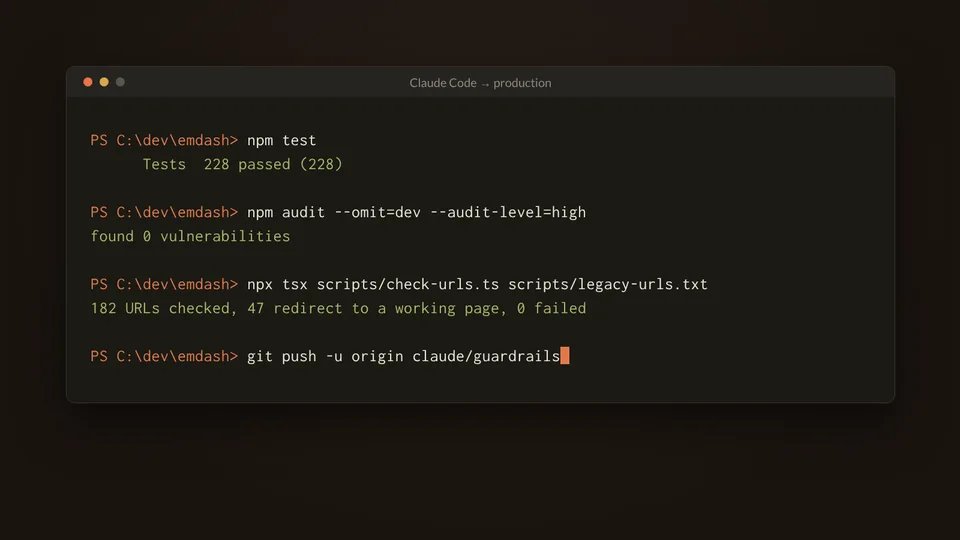
Letting an AI Agent Work on Production – The Guardrails That Make It Safe
Contents
- Introduction: The Code Is Not the Risky Part
- 1. Prerequisites
- 2. Write the Rules Down
- 3. Branches and Pull Requests, Never Main
- 4. A Deploy That Checks Itself and Rolls Back
- 5. Scripts That Default to Doing Nothing
- 6. Where the Guardrails Actually Triggered
- 7. What Still Needs a Human
- Closing
- Related Articles
Introduction: The Code Is Not the Risky PartLink to this section
The usual worry about AI coding agents is that they write bad code. In practice bad code is the easy part: tests, type checks and a reviewer catch most of it. The harder question is what the agent is allowed to do. Can it push to the branch that deploys? Delete files? Change DNS? Publish a post? Merge its own work?
In the week after moving this blog to EmDash on Cloudflare, Claude Code opened eight pull requests against the live site: a CI/CD pipeline, an edge cache, accessibility fixes, security headers, Dependabot and a stack of diagnostics. None of that broke production, and not because the agent never made a mistake. It made several.
This article walks through the guardrails that made that safe, in the order a change meets them, and the moments each one actually mattered.
1. PrerequisitesLink to this section
- A repository the agent works in (this one is an Astro site deployed as a Cloudflare Worker)
- GitHub Actions, or any CI that can run on pull requests and on the main branch
- A way to deploy a new version without sending traffic to it (Cloudflare Workers versions here; deployment slots or blue/green elsewhere)
- An agent that reads a project instruction file (Claude Code reads
CLAUDE.md)
2. Write the Rules DownLink to this section
An agent follows the instructions it is given, so the first guardrail is a plain-text file in the repository. This blog's CLAUDE.md has a short "How to work here" section. The lines that carry the weight:
- Cloud sessions: work on a branch and open a pull request. Merging to `main` deploys;
  never push straight to `main` unless the owner asks.
- Confirm before anything outward-facing or hard to undo: publishing or unpublishing posts,
  deleting content, redirects, GitHub releases, force pushes, changes to Cloudflare settings or DNS.
- Never print, log or commit secrets (`EMDASH_TOKEN`, `CLOUDFLARE_API_TOKEN`, `.env`).
- If a safety check or permission prompt blocks an action, don't work around it;
  explain and let the owner decide.
- Report outcomes faithfully: say what was verified, what wasn't and what failed.
None of these are about code quality. They draw a line between work the agent may finish on its own (anything on a branch) and work that needs me (anything that leaves the repository or cannot be undone).
The last rule matters more than it looks. Every pull request description ends with "Verified" and "Not verified" sections, so I know what was actually tested and what was only reasoned about.
The takeaway: write the rules you would give a new junior admin, and make "what did you not check?" part of every handover.
3. Branches and Pull Requests, Never MainLink to this section
Every push to main deploys this site. The agent works on its own branch, and every change arrives as a pull request. Merging is my decision: the instruction is typically "merge when the preview passes", and it waits for that.
Pull requests get the same checks as a deploy, plus a preview of the change at its own URL:
Check | What it catches |
|---|---|
Biome lint and format | Style drift, unused imports, risky patterns |
Vitest unit tests (228 at the time of writing) | Logic errors in the helpers |
| Type errors in the site and the scripts |
| Known vulnerabilities in production dependencies |
Build plus a bundle-size report | Builds that fail or grow unexpectedly |
Preview at | Anything that only shows up when the real Worker runs |
168 WordPress-era URLs checked against the preview | Broken old links |
Note: previews use the production database and media. Reading is harmless; anything done in a preview's admin changes the live site. Know what your previews are connected to before you hand one to an agent.
The takeaway: the agent can make a mistake on a branch as often as it likes. It only becomes my problem if it reaches main.
4. A Deploy That Checks Itself and Rolls BackLink to this section
Merging is not the last line of defence. The deploy workflow uploads the new version without sending it any traffic, checks it, and only then promotes it:
- Lint, tests, type checks, audit and build (again, on
main) - Upload the new Worker version with no traffic
- Check all 168 old URLs against that version's preview URL
- Record which version is live now
- Promote the new version to 100%
- Check the 168 URLs again, in production
- If anything after promotion fails, roll back automatically
The rollback is two steps in the workflow:
- name: Remember the live version for rollback
  id: live
  run: |
    version_id=$(npx wrangler deployments status --json | jq -r '.versions | max_by(.percentage) | .version_id')
    echo "version_id=$version_id" >> "$GITHUB_OUTPUT"

# ... promote, then check production ...

- name: Roll back to the previous version
  if: failure() && steps.promote.outcome == 'success'
  run: npx wrangler rollback "${{ steps.live.outputs.version_id }}" --yes
Lighthouse runs after every deploy as a separate job, so a slow page fails the run without blocking or undoing a good deploy.
The takeaway: the agent does not need to be right every time. The pipeline needs to notice when it is wrong, and undo it without waiting for me.
5. Scripts That Default to Doing NothingLink to this section
Content changes do not go through the deploy pipeline. They go straight to the CMS through its API, so they need their own brake. Every script in scripts/content/ that changes posts is a dry run unless it is given --apply:
# Shows what would change
npx tsx scripts/content/rewrite-links.ts scripts/content/release-links.json https://ittelligence.blog

# Changes it
npx tsx scripts/content/rewrite-links.ts scripts/content/release-links.json https://ittelligence.blog --apply
The dry run prints would update <slug> for every affected post, so the agent runs it first, shows me the list, and only applies it when the list is what I expect. Posts the agent writes go in as drafts (this one included), and publishing stays on the "confirm first" list.
The takeaway: make the safe behaviour the default, so forgetting a flag costs nothing.
6. Where the Guardrails Actually TriggeredLink to this section
Rules are easy to write. These are the moments in that week where one of them changed the outcome.
A Deletion the Agent Was Not Allowed to MakeLink to this section
The repository root contained a stray empty file called .env, (the comma is part of the name). The agent tried to remove it with git rm as part of a tidy-up, and a permission check blocked the command. The rule says not to work around a block, so it did not rename, empty or ignore the file. It added the deletion to the pull request's "Owner actions" list instead. The file is harmless, but a file with .env in its name is exactly the kind of thing that should get a human look.
A Cloudflare Setting It Talked Me Out OfLink to this section
I asked for Smart Placement to be switched on. It moves the Worker closer to the database instead of the reader. Before changing anything, the agent pointed out that this blog's edge cache lives in the Worker, so moving the Worker away from readers would undo much of the caching work that had just been merged. I skipped it. Cloudflare settings are on the "confirm first" list, and this is why: the agent's job there was to explain the trade-off, not to make the call.
A Vulnerability That Never Reached ProductionLink to this section
A new high-severity advisory for sharp (the image library) appeared while a pull request was open, and the npm audit step turned the pull request red. The vulnerable copy belonged to miniflare, Wrangler's local emulator, which pins sharp to an exact version. npm audit fix --force suggested downgrading Wrangler by over a hundred minor versions. The agent instead added an npm overrides entry that moves only that copy to the patched release, checked that local image resizing still worked, and noted when the override can be removed. The same audit would have stopped the next deploy from main.
Two Dependency Updates That Had to Travel TogetherLink to this section
Dependabot's first run opened separate pull requests for react and react-dom. Both are pinned to the same exact version, so merging either one alone would have broken the admin. The agent caught this while triaging, and grouped the two packages in .github/dependabot.yml so they always arrive as one pull request.
Two Theories That Were WrongLink to this section
One post kept scoring 0.89 in Lighthouse against a 0.9 bar. The agent's first explanation was web fonts; its second was the size of the page. Both were plausible and both were wrong. Instead of acting on either, it added the measurements to the deploy log that would prove or disprove them: LCP phases, font timings, HTML and DOM size. The next deploys disproved both. Had it "fixed" the fonts on the first theory, the change would have been for nothing, and possibly slower.
Theory | What the measurement showed |
|---|---|
Fonts arrive late | All fonts finished within about 200 ms; a passing post loads the same six files |
The page is too big | Its HTML is smaller than a post that passes |
Images near the top | About 76 KB more requested before the text appears, matching the extra ~0.4 s on Lighthouse's simulated phone |
The takeaway: an agent will produce a confident explanation for almost anything. Ask for the measurement that would prove it wrong, before the fix.
7. What Still Needs a HumanLink to this section
Some work stayed with me, by design or because the agent simply could not reach it:
Task | Why it is mine |
|---|---|
DNS records (Google and Bing verification) | No Cloudflare credentials in the agent's environment; DNS is on the "confirm first" list anyway |
Merging pull requests | The merge to |
Testing the PowerShell ports on Windows | The agent's environment is Linux, with no domain or Windows hosts to test against |
Signing in to the CMS admin | Passkeys and email links need me |
Renewing the CMS API token | A weekly workflow opens an issue before it expires; renewing it is mine |
Publishing posts | Drafts only, until I say so |
ClosingLink to this section
None of these guardrails are specific to AI. A branch-and-pull-request workflow, a deploy that checks itself and rolls back, scripts that default to a dry run and a written list of things that need sign-off are what any team should give a new admin on day one. The difference is that an agent works fast enough to find every gap in that list within a week.
The agent made mistakes: two wrong theories, a dev server it left running, a rewrite that would have reformatted an entire lockfile until it reverted it. None of them reached readers, because each one ran into a check before it got that far.
The repository, workflows and CLAUDE.md described here are the ones running this site.
Related ArticlesLink to this section
- How to Set Up Claude Code Properly
- Model Context Protocol – Connecting AI to the World
- Moving ITtelligence from WordPress.com to EmDash
No comments yet
Comments are moderated and appear once approved.