How to Export LAPS Passwords to KeePass
- LAPS deployed with passwords stored in AD
- PowerShell ActiveDirectory module (RSAT)
- Rights to read the LAPS password attribute
- KeePass to import the XML
IntroductionLink to this section
"Local Administrator Password Solution" (LAPS) is a great way to automatically set Active Directory computer local administrator passwords, each to a random value, and leverage Active Directory to store this password.
Even though LAPS provides a password viewer it cannot be used offline and some of my clients already adopted solutions such as KeePass to store their other system passwords.
It was this that motivate the creation of this LAPS to KeePass XML script
The Script (LAPSToKeePass.ps1)Link to this section
Please see the comments within the script for an explanation of what it is doing. The script is a bit more verbose than necessary but it might be more understandable this way.
# Get all computer with LAPS passwords
$computers = Get-ADComputer -Filter {ms-Mcs-AdmPwd -like "*"} -Properties ms-Mcs-AdmPwd,operatingsystem | select @{Label="Name";Expression={$_.name}}, @{Label="OS";Expression={$_.operatingsystem}}, @{Label="Distinguished name";Expression={$_.'distinguishedname'}},@{Label="Password";Expression={$_.'ms-Mcs-AdmPwd'}}

$date = Get-Date -UFormat '+%Y-%m-%dT%H:%M:%S.000Z';

[xml]$doc = New-Object System.Xml.XmlDocument
$dec = $Doc.CreateXmlDeclaration("1.0","UTF-8",$null);
$doc.AppendChild($dec) | Out-Null;

$keePassFile = $doc.CreateNode("element","KeePassFile",$null);
$doc.AppendChild($keePassFile) | Out-Null;

$root = $doc.CreateNode("element","Root",$null);
$keePassFile.AppendChild($root) | Out-Null;

$group = $doc.CreateNode("element","Group",$null);
$root.AppendChild($group) | Out-Null;

# ... (Full XML building code for KeePass structure)
# See full script in article

$doc.InnerXml;ExecutionLink to this section
To execute this script, run the following from Powershell, where .\LAPSExport.xml is the desired name and path of the outputted XML file
.\LAPSToKeePass.ps1 | Out-File -Encoding UTF8 -FilePath .\LAPSExport.xmlImporting into KeePassLink to this section
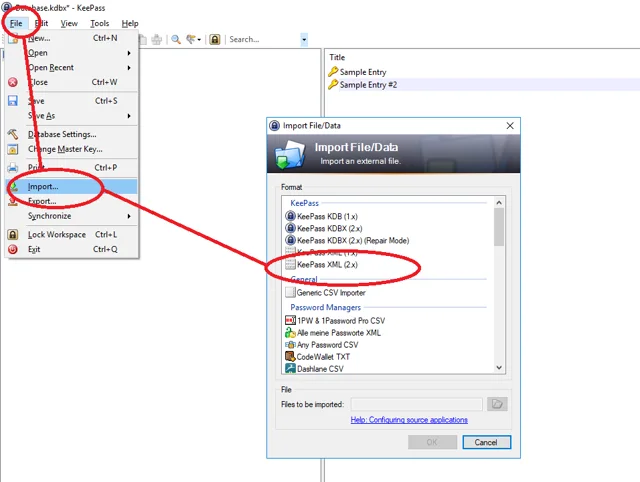
To import into KeePass, you can do it directly via the GUI with the import option or you can automate the process via KPScript.
Information on KPScript can be found here https://keepass.info/help/v2_dev/scr_sc_index.html

ConclusionLink to this section
There you have it. Essentially every time you run this script it will generate an output that can be saved as XML and imported into KeePass.
Please ensure that you filter out any accounts that you do not want to be exported.
This process was tested with the following
- KeePass v2.41
- Active Directory 2016 (although it should work perfectly fine on 2019)
- LAPS v6.2
No comments yet
Comments are moderated and appear once approved.