How to restore Active Directory Group Policy with only SYSVOL data
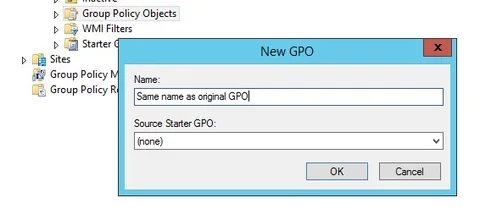
1) Create new, blank Group PolicyLink to this section
Using GPMC.msc create a new, blank GPO with the same name as the original.
2) Overwrite Group Policy DataLink to this section
a) Record the Unique ID that was assigned to GPO created in Step 1
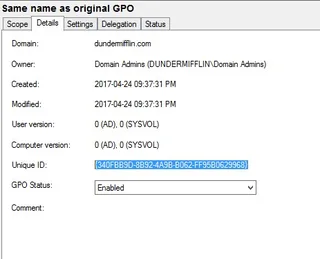
b) Copy Machine, User and GPT data from original GPO

c) Paste data (overwrite) into the folder assigned to GPO created in Step 1. The folder is named the same as the Unique ID recorded in Step 2a

3) Fixing Group Policy Settings PreviewLink to this section
Note that after completing Step 1 and Step 2, even though the GPO settings are available within Edit, the Settings Preview shows No settings defined

a) Edit GPO, browse to any unconfigured setting and open it. Tick and untick Define this policy setting and click OK

b) If your GPO contains any Preferences browse to any one of them and simply open it and click OK

Settings Preview should show settings

4) Fixing Group Policy PermissionLink to this section
Unfortunately following this process does not restore the original permissions, this has to be added back manually.
No comments yet
Comments are moderated and appear once approved.