Active Directory Cleanup Tool (ADCleanup)
- Service account to perform the cleanup
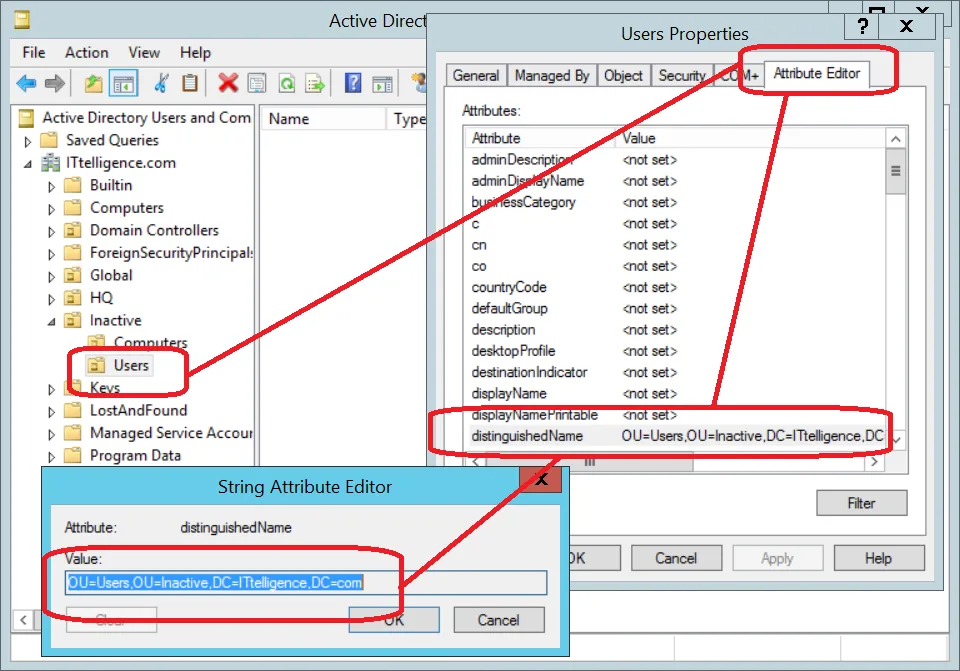
- OU for inactive user accounts
- OU for inactive computer accounts
- Computer to run it as a scheduled task
IntroductionLink to this section
ADCleanup is my implementation of a set-and-forget Active Directory cleanup tool. Once this tool is implemented correctly, you never need to worry about dormant accounts ever again.
ImplementationLink to this section
1) Download and extract ADCleanup.zip (here is VirusTotal scan) to a folder of your choice, saved on the computer on which it will be scheduled to run.
2) Create a location in Active Directory to store inactive user accounts and record the distinguished name (DN).

3) Create a location in Active Directory to store inactive computer accounts and record the distinguished name (DN).

4) Run Configurator.exe (Configurator Editor).
a) On the Encrypt tab, enter the password for the account that will be performing the cleanup task. Encrypt it with key 9hOK7AtlGOCRyBtBdhF9pnTQuk8ES176 and record encrypted password

b) On the Settings tab, enter the fully qualified domain name, cleanup account user name and the encrypted password recorded in step 4a
c) Set userCleanup to true to enable the process to clean up user accounts. Set user cleanup parameters
d) Set userDisabledOU to value recorded in step 2
e) Set computerCleanup to true to enable the process to clean up user accounts. Set computer cleanup parameters
f) Set computerDisabledOU to value recorded in step 3

g) On the userExcludedDNs tab, specify any distinguished name of an organizational unit that should be excluded from the cleanup process (+ or INS to add, - or DEL to delete, Enter or double-click to edit)
g) On the computerExcludedDNs tab, specify any distinguished name of an organizational unit that should be excluded from the cleanup process (+ or INS to add, - or DEL to delete, Enter or double-click to edit)

h) Schedule ADCleanup.exe to execute via a scheduled task. Upon every execution, the tool will clean up user and computer objects as per your configuration
ConclusionLink to this section
Using this process, (or one similar) will keep Active Directory clean from the unused computer and user objects, and increases server security in the process.
No comments yet
Comments are moderated and appear once approved.