How to Implement Active Directory Shadow Groups
- Service account to run the sync
- Rights to modify shadow group membership
- Existing group and OU to shadow
IntroductionLink to this section
Some administrators prefer assigning permissions based on Active Directory placement, similar to how you can assign permissions to containers in NDS. Because this capability is not available natively in Active Directory, they spend a lot of time keeping group membership and objects within an organizational unit in sync.
This is my implementation of syncing Shadow groups with organizational units.
SetupLink to this section
1) Download ShadowGroup tool and extract to a folder on your file server.
2) Run Configurator.exe (Configurator Editor).
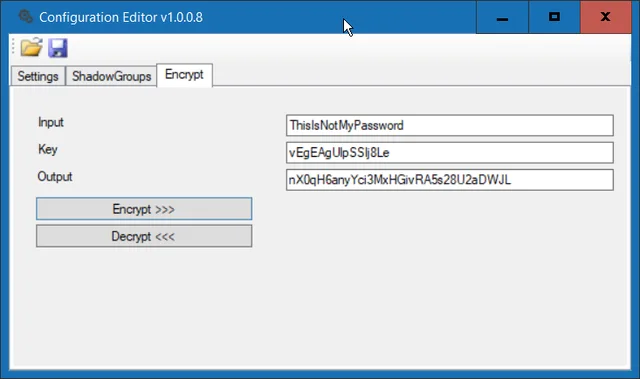
a) On the Encrypt tab, enter the password for the account that will be performing the cleanup task. Encrypt it with key vEgEAgUlpSSIj8Le and record the encrypted password.

b) On the Settings tab, enter the distinguished name, fully qualified domain name, NetBIOS, and username and the encrypted password.

c) On the ShadowGroups tab, specify the group name and the distinguished name of an organizational unit that group should shadow
The codeLink to this section
public static bool ShadowGroup(Models.DomainInfo DomainInfo, string OUPath, string GroupName, out string Message)
{
    try
    {
        DirectoryEntry directoryEntry = new DirectoryEntry("LDAP://" + DomainInfo.FQDN + "/" + OUPath, DomainInfo.NetBIOS + @"\" + DomainInfo.UserName, DomainInfo.Password);
        DirectoryEntry groupDirectoryEntry;
        string message;

        if (GetGroupDEByName(DomainInfo, GroupName, out groupDirectoryEntry, out message))
        {
            if (ClearGroupMembers(groupDirectoryEntry, out message))
            {
                DirectorySearcher directorySearcher = new DirectorySearcher(directoryEntry);
                directorySearcher.PageSize = 1000;
                directorySearcher.Filter = "(|(&(objectClass=person)(objectClass=user))(objectClass=group))";

                foreach (SearchResult searchResult in directorySearcher.FindAll())
                {
                    try
                    {
                        DirectoryEntry childDirectoryEntry = searchResult.GetDirectoryEntry();
                        string distinguishedName = "";
                        string groupSID = "";
                        SecurityIdentifier sid;
                        try { sid = new SecurityIdentifier(childDirectoryEntry.Properties["objectSid"][0] as byte[], 0); groupSID = sid.Value; } catch { }
                        try { distinguishedName = childDirectoryEntry.Properties["distinguishedName"].Value.ToString(); } catch { }
                        if (groupSID != "")
                        {
                            groupDirectoryEntry.Properties["member"].Add(distinguishedName);
                            groupDirectoryEntry.CommitChanges();
                        }
                    }
                    catch { }
                }
                Message = message;
                return true;
            }
        }
        Message = message;
        return false;
    }
    catch (Exception ex)
    {
        Message = ex.Message;
    }
    return false;
}
Demo ExecutionLink to this section

I hope you found this tutorial useful. You are encouraged to ask questions, report any bugs or make any other comments about it below.
No comments yet
Comments are moderated and appear once approved.