How to Fix Active Directory Subnets with NETLOGON Parsing
- Domain controller or copied NETLOGON.log files
IntroductionLink to this section
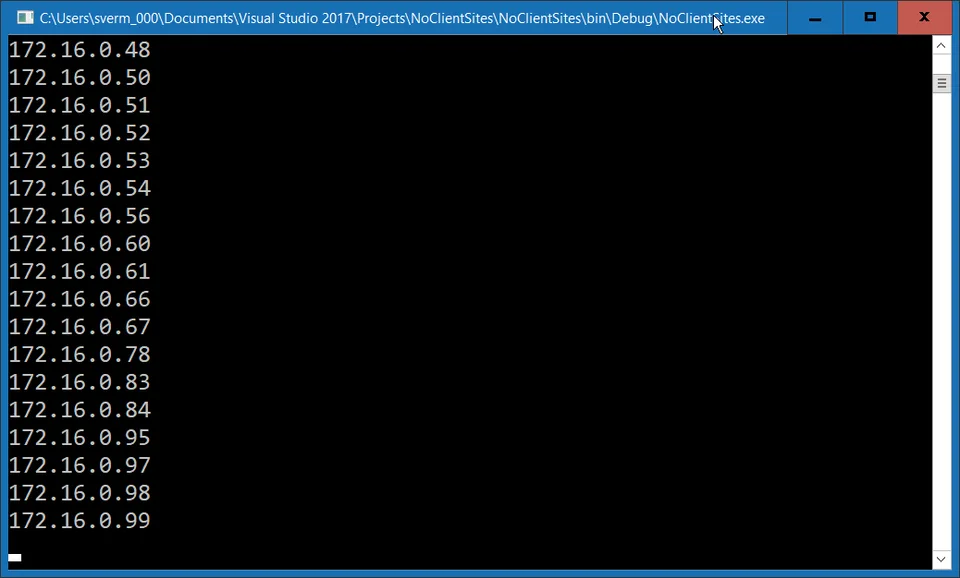
NoClientSites.exe is a NETLOGON.log parser that is used to get a list of all authentications that happened from clients where the Active Directory site is not defined.
These IP addresses can then, in turn, be used to add the appropriate sites and subnets into Active Directory Sites and Services.
DownloadLink to this section
A compiled version of NoClientSites.exe can be downloaded here, or compiled from the code provided at the end of this article.
https://github.com/svermaak/downloads/raw/main/NoClientSites.zip
UsageLink to this section
NoClientSites.exe provides two methods to get IP addresses without client sites.
The first method allows parsing a whole folder that contains multiple NETLOGON.log files, pre-copied to a central location.
NoClientSites.exe [PATHTONETLOGONFILES]Alternatively, the NoClientSites.exe tool can be directly executed on each Domain Controllers
NoClientSites.exeThe CodeLink to this section
using System;
using System.Collections.Generic;
using System.IO;
using System.Linq;
using System.Text;
using System.Threading.Tasks;

namespace NoClientSites
{
    class Program
    {
        static void Main(string[] args)
        {
            List<string> netlogonFilePaths = new List<string>();

            if (args.Length == 1)
            {
                string logPath = args[0];
                if (Directory.Exists(logPath))
                {
                    foreach (string file in Directory.GetFiles(logPath, "*.log"))
                    {
                        netlogonFilePaths.Add(file);
                    }
                }
            }
            else
            {
                netlogonFilePaths.Add(Path.Combine(Environment.GetEnvironmentVariable("SystemRoot"), "Debug", "netlogon.log"));
            }

            if (netlogonFilePaths.Count > 0)
            {
                SortedSet<string> ipAddressesWithoutSites = new SortedSet<string>();
                foreach (string netlogonFilePath in netlogonFilePaths)
                {
                    processNetlogon(netlogonFilePath, ref ipAddressesWithoutSites);
                }

                foreach (var ipAddress in ipAddressesWithoutSites)
                {
                    Console.WriteLine(ipAddress);
                }
            }
            else
            {
                ShowUsage();
            }
        }
        static void processNetlogon(string netlogonFilePath, ref SortedSet<string> ipAddressesWithoutSites)
        {
            try
            {
                StreamReader netlogonFile = new StreamReader(netlogonFilePath);
                string line;
                while ((line = netlogonFile.ReadLine()) != null)
                {
                    if (line.Contains("NO_CLIENT_SITE"))
                    {
                        ipAddressesWithoutSites.Add(line.Replace("NO_CLIENT_SITE: ", "|").Split('|')[1].Trim().Split(' ')[1]);
                    }
                }
            }
            catch
            {
                ShowUsage();
                Console.WriteLine($"Error reading file \"{netlogonFilePath}\"");
            }
        }
        private static void ShowUsage()
        {
            Console.WriteLine("NoClientSites.exe [PATHTONETLOGONFILES]");
            Console.WriteLine("Or without a path directly on a Domain Controller");
            Console.WriteLine("NoClientSites.exe");
        }
    }
}
Demo ExecutionLink to this section

I hope you found this tutorial useful. You are encouraged to ask questions, report any bugs or make any other comments about it below.
No comments yet
Comments are moderated and appear once approved.