MVC EditorTemplate for Date, DateTime, and Time
The SetupLink to this section
If you do not understand what I mean by unintuitive, try creating the following MVC web application or skip to The Problem section below
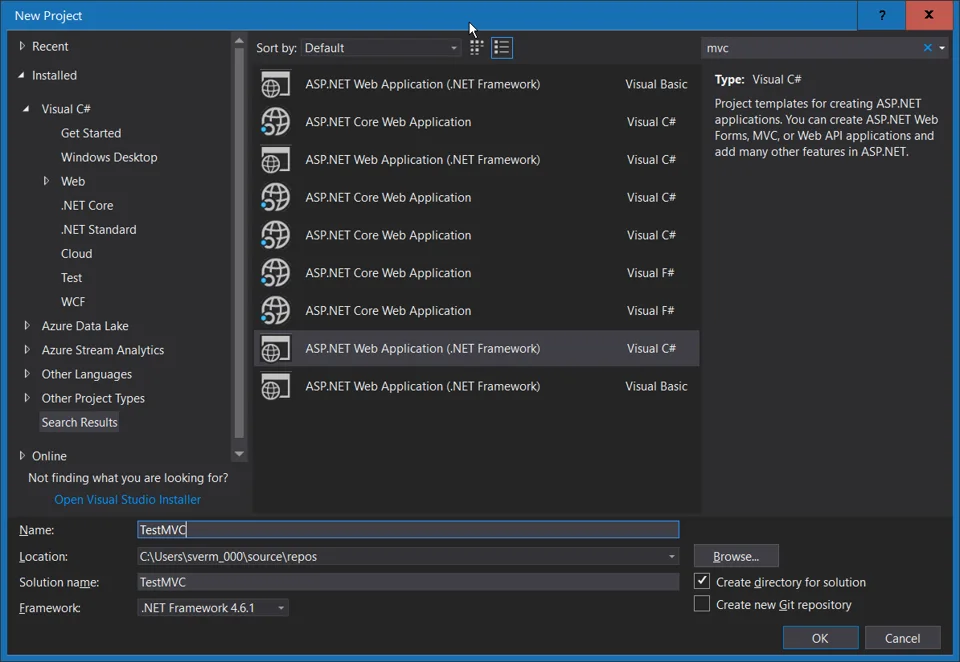
1) Start a new project ASP.NET Web Application in Visual Studio

2) Set MVC as the template type

3) Add an Entity Framework Model of a SQL database. For this article, it is a simple table that contains a few columns including a Date, DateTime and Time. You can generate the database from the Project files linked at the end of the article.

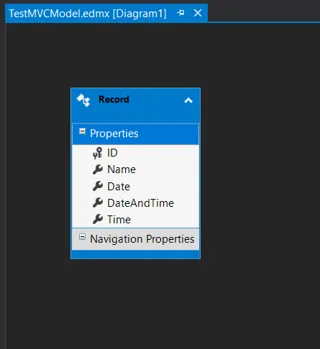
4) Scaffold a Controller and Views from this Model

5) Alter Layout so that a link to this new Controller is added to the navigation menu

The ProblemLink to this section
Notice that when you run this MVC web application the Date, DateTime and Time columns from the model is shown as a basic textbox.
The Solution, Editor TemplatesLink to this section
1) Start by adding the JQuery UI and JQuery Timepicker Addon NuGet packages with the Package Manager Console
The commands are:
Install-Package jQuery.UI.Combined -Version 1.12.1
Install-Package jQuery-Timepicker-Addon -Version 1.6.3
2) Add a JavaScript file called site.js to the Scripts folder
3) Add this code to the site.js file
$(document).ready(function () {
    $(":input[date-picker]").datepicker({
        dateFormat: "yy/mm/dd",
    });
    $(":input[datetime-picker]").datetimepicker({
        dateFormat: "yy/mm/dd",
        timeFormat: "HH:mm:ss"
    });
    $(":input[time-picker]").timepicker({
        timeFormat: "HH:mm:ss"
    });
})
Essentially this JavaScript triggers when DOM is ready and applies the appropriate picker control based on the attribute set within the EditorTemplates in steps 6, 7 and 8
4) Add references to these new files to the _Layout.cshtml file located in the Views then Shared folder
5) Add a folder called EditorTemplates to the Shared folder under Views
6) Add a view called Date.cshtml to this new EditorTemplates folder and add this code
@model System.DateTime?

@Html.TextBox("", ViewData.TemplateInfo.FormattedModelValue, new { date_picker = true, @class = "form-control", autocomplete = "off" })
This will add the date-picker attribute via the Editor Template model if the column is a DateTime
7) Add a view called DateTime.cshtml to this new EditorTemplates folder and add this code
@model System.DateTime?

@Html.TextBox("", ViewData.TemplateInfo.FormattedModelValue, new { datetime_picker = true, @class = "form-control", autocomplete = "off" })
8) Add a view called TimeSpan.cshtml to this new EditorTemplates folder and add this code
@model System.TimeSpan?

@Html.TextBox("", ViewData.TemplateInfo.FormattedModelValue, new { time_picker = true, @class = "form-control", autocomplete = "off" })
9) Adding a Date UIHint
You might notice that two Editor Templates exist for DateTime. Unfortunate C#, unlike MSSQL, does not have a Date type. Luckily we can nudge MVC to display it as a Date Editor Template with a UIHint
namespace TestMVC
{
    using System;
    using System.Collections.Generic;
    using System.ComponentModel.DataAnnotations;

    public partial class Record
    {
        public System.Guid ID { get; set; }
        public string Name { get; set; }
        [UIHint("Date")]
        [DisplayFormat(DataFormatString = "{0:yyyy/MM/dd}", ApplyFormatInEditMode = true)]
        public System.DateTime Date { get; set; }
        [DisplayFormat(DataFormatString = "{0:yyyy/MM/dd HH:mm:ss}", ApplyFormatInEditMode = true)]
        public System.DateTime DateAndTime { get; set; }
        public System.TimeSpan Time { get; set; }
    }
}
The ResultLink to this section
The date columns have a date picker
The date and time columns have a date and time picker

The time columns have a time picker

You can download the project used within this article from https://bitbucket.org/svermaak/testmvc/downloads/
No comments yet
Comments are moderated and appear once approved.