Updating Excel Links in Thousands of Files
- 7za.exe in System32 or path
IntroductionLink to this section
I found myself in a situation where thousands of Excel files had UNC (Universal Naming Convention) cross-links to each other with the name of a server that was decommissioned.
For some reason, probably security related, adding a CNAME (Canonical Name) that resolved the old server name to the new server name didn't work. Using NETDOM to add the old server name as an alternative name was also not an option because the new server could not be restarted without organizing downtime.
I tried various commercial tools, such as PowerGrep. Not only are these expensive, the ones I tried cannot replace a value in a function, only the resulting value.
I knew XLSX files are basically a ZIP file with special headers; so, playing around I managed to get a Powershell replace function going.
DependencyLink to this section
Download and extract 7za.exe into %WINDIR%\System32 folder so that it is available from any folder
https://www.7-zip.org/download.html
PowershellLink to this section
Run this to import the Update-ExcelLinks function:
function Update-ExcelLinks($xlsxFile, $oldText, $newText) {
    $bakFile = $xlsxFile -ireplace [regex]::Escape(".xlsx"), ".bak"
    $zipFile = $xlsxFile -ireplace [regex]::Escape(".xlsx"), ".zip"
    $parent = [System.IO.Path]::GetTempPath();
    [string] $guid = [System.Guid]::NewGuid();
    $tempFolder = Join-Path $parent $guid;
    New-Item -ItemType Directory -Path $tempFolder;
    Rename-Item -Path $xlsxFile -NewName $zipFile
    7za.exe x "$zipFile" -o"$tempFolder"
    $fileNames = Get-ChildItem -Path $tempFolder -Recurse -Include *.xml,*.xml.rels
    foreach ($file in $fileNames)
    {
        (Get-Content -ErrorAction SilentlyContinue $file.PSPath) |
        Foreach-Object { $_ -replace $oldText, $newText } |
        Set-Content $file.PSPath
    }
    Set-Location -Path $tempFolder
    7za.exe u -r "$zipFile" *.*
    Rename-Item -Path $zipFile -NewName $xlsxFile
}
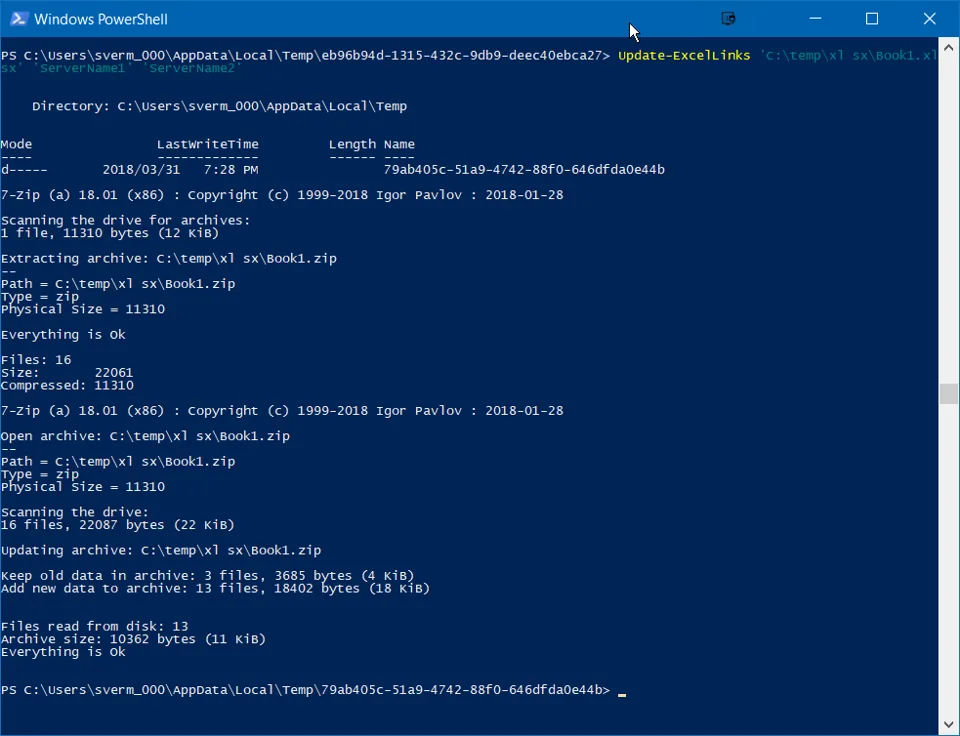
Demo ExecutionLink to this section
To update values in Excel file, use the following command:
Update-ExcelLinks THEEXCELFILE.xlsx OLDTEXT NEWTEXT
Problem solved!
No comments yet
Comments are moderated and appear once approved.