FSMainFolder – Files Server Structure Automation Tool
- SetACL command-line version
- Run on the file server
- Domain account for creating AD groups
IntroductionLink to this section
FSMainFolder is a tool I developed to create a folder structure in a controlled and standardized way.
DefinitionsLink to this section
- Main folder: A folder created by the file server administrator that define the main structure. Main folders are the only folder on which permissions are assigned to. Main folders have Deny Delete rights assigned to prevent users from deleting these folders
- Root main folder: Does not inherit parent folder permission. Non-root main folders inherit permissions from parent
- User folder: A folder created by end-users to structure within the main structure. End-users can freely create and delete these folders.
FeaturesLink to this section
- Automatically create the folder with Deny Delete rights
- Can create root and subfolders
- Can be configured to create an Active Directory group dedicated for users with change and/or read permissions and assigns the correct permission
- Assigns the specified user as the owner of the group
- Assigns the specified description on the newly created Active Directory groups
- Assigns a custom icon clearly identify main folders
SetupLink to this section
1) Download the command line version of SetACL and extract to a folder on your file server.
2) Download FSMainFolder tool and extract to a folder on your file server.
3) Run Configurator.exe (Configurator Editor).
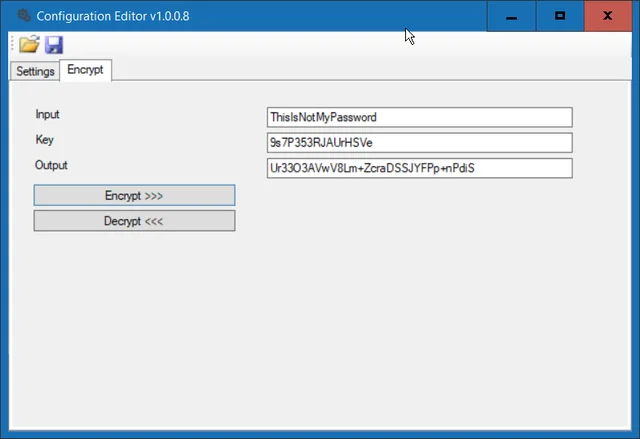
a) On the Encrypt tab, enter the password for the account that will be performing the cleanup task. Encrypt it with key 9s7P353RJAUrHSVe and record the encrypted password.

b) On the Settings tab, enter the distinguished name, fully qualified domain name, NetBIOS, and username and the encrypted password.
c) Specify option for how to name groups.
d) Specify the path where you extracted SetACL.exe to.
UsageLink to this section
Command parameters are supplied to control the main folder creation process
FSMainFolder.exe PARENTFOLDER MAINFOLDERNAME MAINFOLDERDESCRIPTION MAINFOLDEROWNER ROOTFOLDER CHANGEGROUP EXECUTEGROUPFor example, the following will create a main folder D:\CorporateData\Sales, a change, and a read-only group and assign the correct permissions.
FSMainFolder.exe "D:\CorporateData" Sales "This folder is assigned to the Sales Team" JDOE TRUE TRUE TRUEDemo ExecutionLink to this section
Running the command

Resulting folders

Resulting groups

I hope you found this tutorial useful. You are encouraged to ask questions, report any bugs or make any other comments about it below.
No comments yet
Comments are moderated and appear once approved.