UserResourceCleanup
- Service account for the cleanup task
- Backups of user data
- Computer to schedule the tool on
Introduction
A GPO exist that can be configured to automatically delete old user profiles and a process such as CircularLogArchiver can be used to clean up log or old data but what about user data?
UserResouceCleanup can take care of this by monitoring the user data folders and Active Directory.
Configuring UserResourceCleanup
a) Download and extract UserResourceCleanup.zip (here is VirusTotal scan) to a folder of your choice on the computer which it will be scheduled to run on.
b) Run Configurator.exe (Configurator Editor).
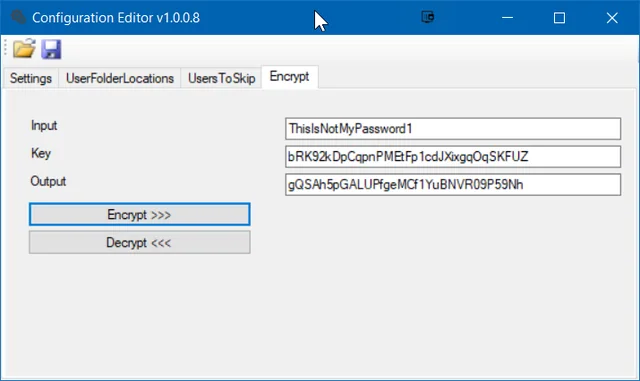
c) On the Encrypt tab, enter the password for the account that will be performing the automated placement task. Encrypt it with key bRK92kDpCqpnPMEtFp1cdJXixgqOqSKFUZ and record encrypted password

d) On the Settings tab, enter the domain information, connection username and the encrypted password recorded in step c. Configure UserNameMatch to a RegEx query that will match user account format. If you do not have a specific format, use .*

e) On the UserFolderLocations tab, specify folders to monitor to redundant user data

f) On the UsersToSkip tab, specify user folders to skip

g) Save configuration files
h) Schedule UserResourceCleanup.ConsoleApp.exe as a scheduled tasks
Conclusion
Using this process will keep recover space by removing old/redundant user data, just make sure that you have backups to cheap/slower storage in case you need to recover data.
No comments yet
Comments are moderated and appear once approved.